
There’s a line on the invoice that says “hosting”, it renews every year, and nobody in the business can say what it pays for. The developer who set it up has moved on. The site is slower than it was. And someone has just asked whether the Shopify plan already covers it.
If that’s you, the answer is below: what web hosting is and how web hosting works, what each kind costs in Australian dollars, how to tell whether hosting is the reason your site is slow or down, and who should hold the login.
What is web hosting? Web hosting is renting space on a server, a computer that stays connected to the internet, so your website’s files, images and database are available whenever someone types your address. The host runs the server. Your domain name is a separate thing: it’s the address that points to the host. Platforms like Webflow, Shopify and Squarespace include hosting in their plan. A WordPress or custom-coded site needs a hosting plan bought separately.
In this guide
- What web hosting is, and what it costs in Australia
- Is hosting why your site is slow, down or hacked?
- Who holds the keys, and how to move host without downtime
- What to check before you pay for hosting
- Does it matter where the server is?
What web hosting is, and what it costs in Australia
Three separate things make a website work, and they’re often bought from three different companies.
The domain name (yourbusiness.com.au) is the address. In Australia it’s a licence administered by auDA, and it can be moved between registrars at no fee with a transfer code that belongs to the registrant, which should be you, not your developer.
The hosting is the server the site’s files sit on. When someone types the address, their browser asks the host for the files and the host sends them back. That’s the whole job. Storage, bandwidth, a control panel, backups and an SSL certificate are the extras a host bundles around it.
The website is the thing people see. It was designed and built by someone, and it lives on the host.
So “do I need web hosting?” has one answer: yes, every live website is hosted somewhere. Website hosting and web hosting are the same thing with two names. The real question is whether you’re paying for it as a separate line or whether it’s already inside something else you pay for.
The five shapes hosting comes in
Most guides list four types of web hosting, shared, VPS, dedicated and cloud, which is how hosts sell servers. Shared means your site sits on a server with hundreds of others, VPS gives it a reserved slice, dedicated gives it the whole machine, and cloud spreads it across several. That’s useful to know and it isn’t how Australian small businesses buy hosting. In practice the web hosting bill takes one of five shapes.
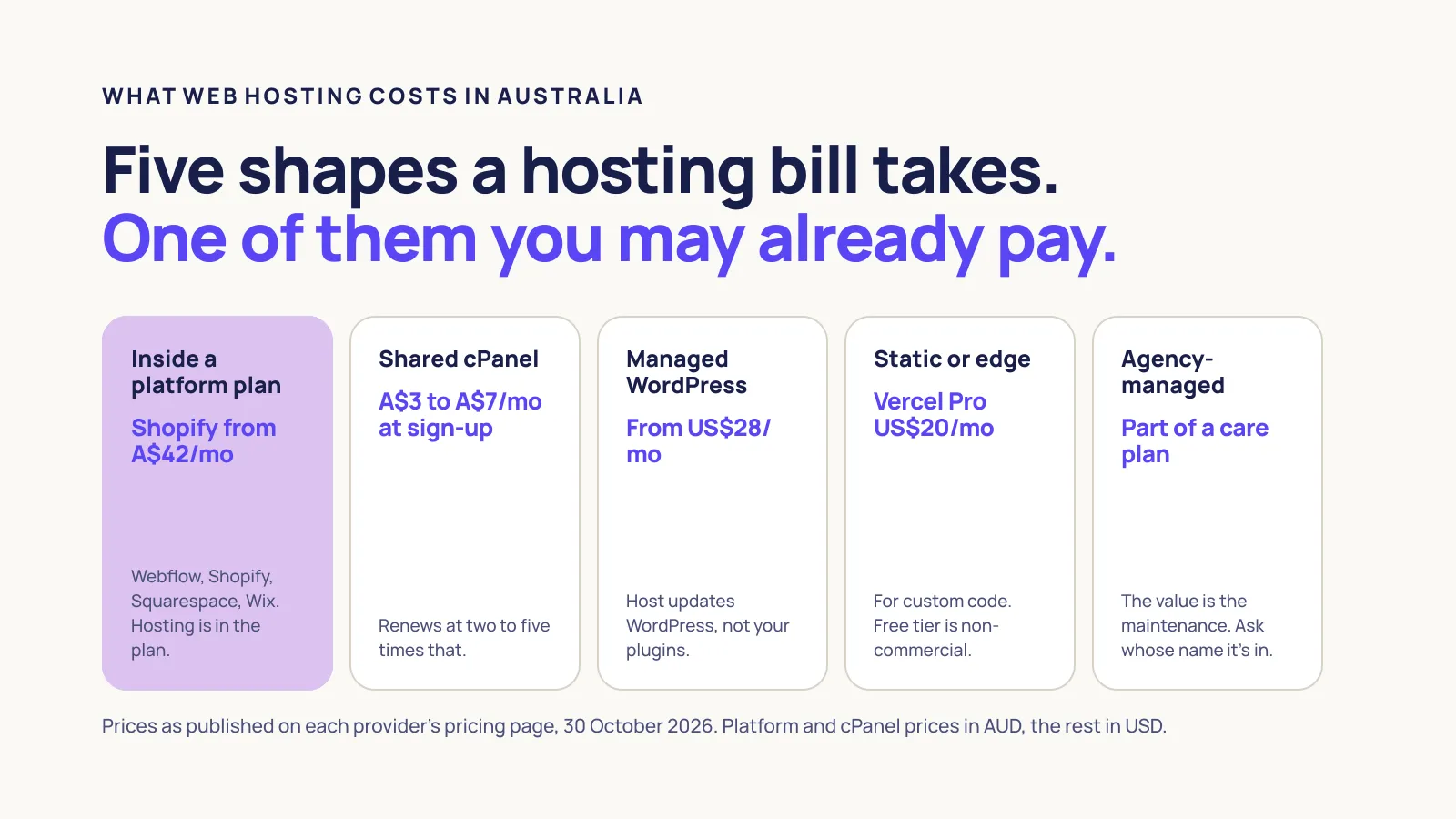
| Hosting shape | What it is | Price as published (Oct 2026) | The catch |
|---|---|---|---|
| Inside a platform plan (Webflow, Shopify, Squarespace, Wix) | Hosting, SSL and bandwidth come with the subscription | Shopify Basic A$42 a month on yearly billing, A$56 monthly. Squarespace A$17 to A$149 a month. Webflow US$15 (Basic) or US$25 (CMS) per site, billed yearly | You can’t move the site to a cheaper host. If you leave the platform, you rebuild. |
| Shared cPanel hosting (VentraIP, Hostinger, GoDaddy, SiteGround) | A slice of one server shared with other sites, usually for WordPress | VentraIP business hosting A$5.50 a month against a listed A$11. Hostinger Premium A$2.99 a month on a 48-month term, renewing at A$15.89. GoDaddy Economy A$6.95 for the first year, list A$18.95 | The sign-up price is not the renewal price. SiteGround’s Australian page lists its StartUp plan at $4.99, renewing at $26.99 ex GST, more than five times the entry price. |
| Managed WordPress hosting (WP Engine, Kinsta) | A host that also updates, backs up and secures WordPress | WP Engine Essential US$28 a month billed yearly. Kinsta Single US$30 a month billed yearly | Priced in US dollars. The host manages WordPress, not your plugins or your content. |
| Static or edge hosting (Vercel, Netlify, Cloudflare Pages) | For custom-coded sites built in Astro, Next.js and similar | Vercel Pro US$20 a month. The free Hobby plan is for “personal, non-commercial use” | A business site built by an agency is commercial use, so it belongs on a paid plan, in your name. |
| Agency-managed hosting | Your web agency hosts the site as part of a maintenance plan, often on wholesale cPanel in a Sydney data centre or on one of the platforms above | Varies. Ask what’s underneath | The value is the maintenance, not the server. Ask whose name the account is in. |
Prices are what each company published on its Australian or international pricing page on 30 October 2026. GST treatment varies by page, and prices change often. The pattern doesn’t: platform plans bundle hosting, cPanel hosts discount the first term, and the US-dollar plans need converting before you compare.
Why the cheap price is the wrong number
Hostinger’s A$2.99 a month is real, but it means paying A$143.52 up front for four years, after which the same plan renews at A$15.89 a month. SiteGround’s $4.99 becomes $26.99. GoDaddy’s A$6.95 becomes A$18.95. At all three hosts, the first term is the discount and the renewal is the business.
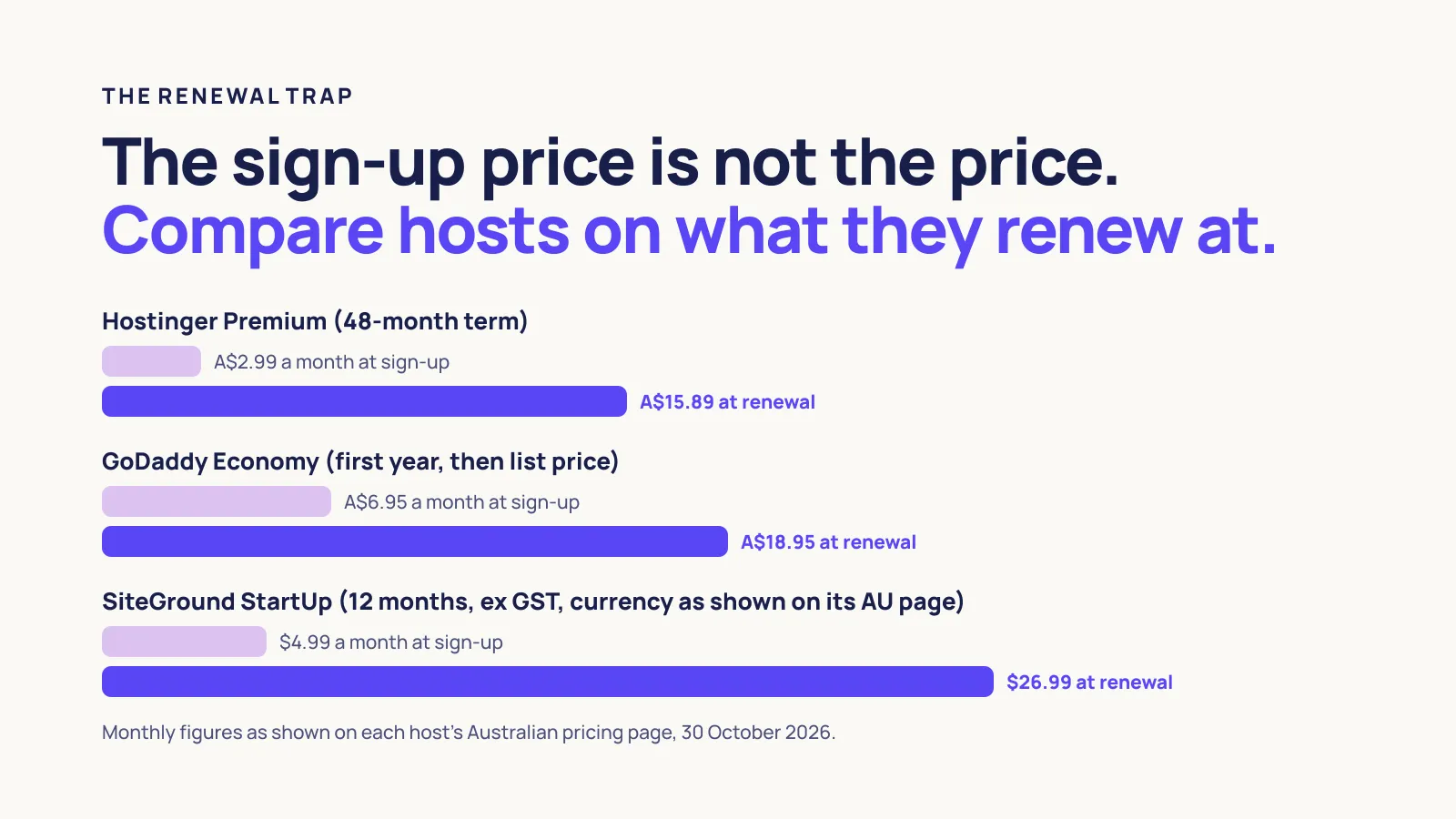
For a website that will be around for five years, the renewal price is the web hosting cost. Compare hosts on that figure, and check what a platform plan already includes before paying for both.
Paying twice
A web hosting mistake we see at Webhaus is paying for two plans rather than overpaying for one. A business moves its store to Shopify, which includes hosting, and the old cPanel plan the previous developer set up keeps renewing on a company card for years. Nothing is on it any more.
Nobody cancels it because nobody knows what it is.
If your site is on Webflow, Shopify, Squarespace or Wix and you also pay a hosting company, one of those two bills is probably for nothing. The exception is email: some businesses keep a cPanel plan only because their mailboxes live there, which is a reason to move the email, not to keep the server.
Is hosting why your site is slow, down or hacked?
Web hosting gets blamed for most website problems and causes a minority of them. Here’s how to tell which is which from the outside, without a developer.
The site won’t load at all
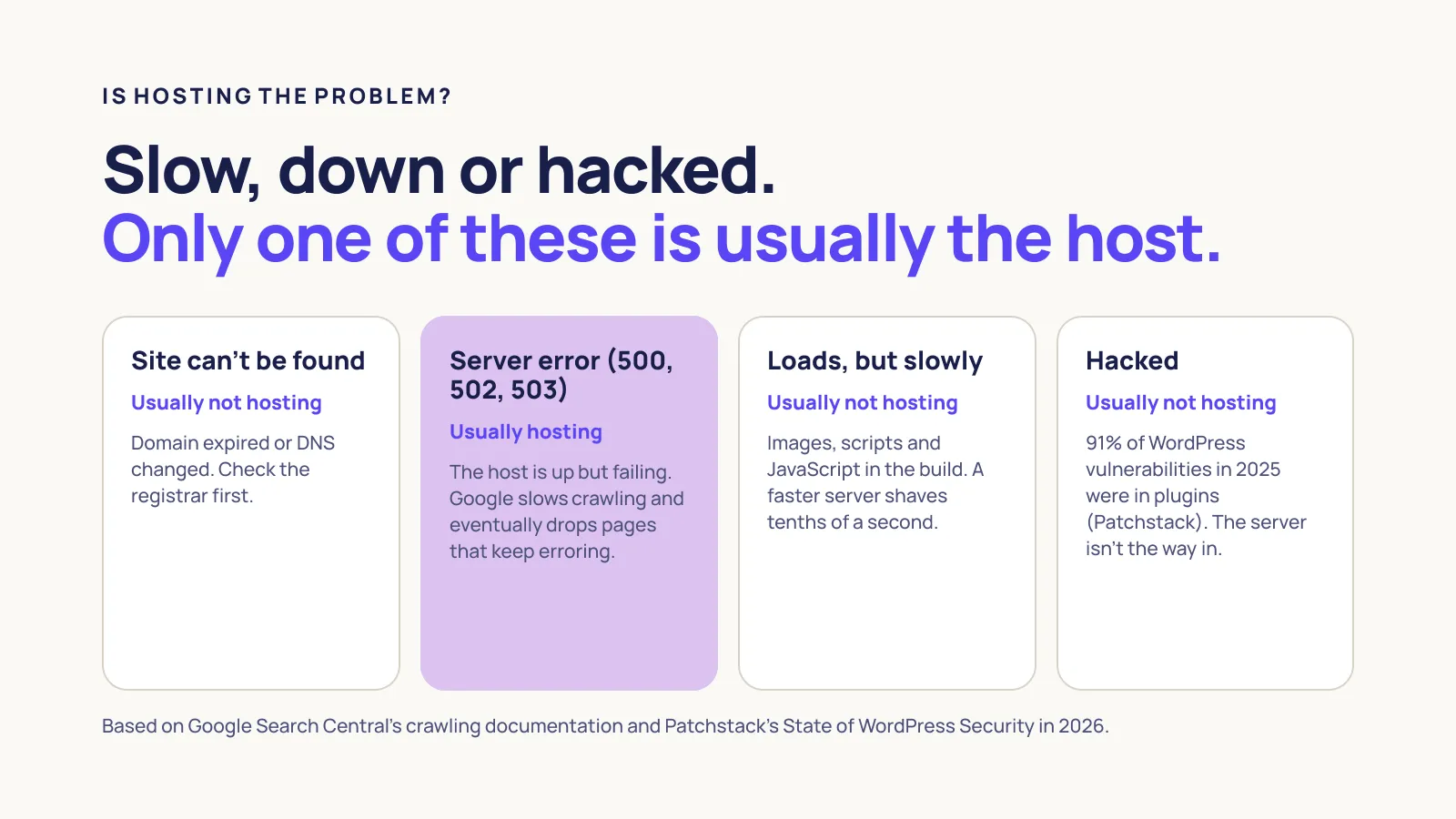
Open the site on your phone with wifi off. If the browser says the site can’t be found or the address doesn’t exist, the problem is usually the domain, not the host: the licence has expired, or the DNS records that point the domain at the host have been changed. Check the domain’s expiry at your registrar first.
If the browser connects but shows a server error (a “500”, “502” or “503” page), that is hosting. The server is up but failing, or overloaded. Google’s crawling documentation says 5xx errors make Googlebot “temporarily slow down” crawling, that pages already indexed “are preserved in the index, but eventually dropped”, and that URLs which “persistently return a server error” are removed. There’s no published timeframe, so treat a server error that lasts more than a few hours as urgent.
The site loads but it’s slow
Test the live site in Google’s PageSpeed Insights. Google’s own thresholds are a Largest Contentful Paint of 2.5 seconds or less, an Interaction to Next Paint of 200 milliseconds or less, and a Cumulative Layout Shift of 0.1 or less, measured at the 75th percentile of real visits. Google’s web.dev team reports that the BBC found it lost an extra 10% of users for every additional second a page took to load.
If the report blames a slow initial server response, that’s hosting, and a crowded shared plan is a common reason. If it blames large images, render-blocking scripts or too much JavaScript, the host can’t fix it. That’s the build, and a faster server would shave tenths of a second off a page that needs seconds cut. A content delivery network helps here by caching copies of the site near visitors, but as Cloudflare’s own explainer puts it, a CDN “does not host content and can’t replace the need for proper web hosting”.
One example from our own work: Studio Montel, a strength studio in Miranda, is a custom Astro build we rebuilt from scratch. Its speed comes from the build shipping almost no JavaScript, not from an expensive server. The hosting behind it is a modest plan.
The site has been hacked
If it’s a WordPress site, the host is rarely the way in. Patchstack counted 11,334 new vulnerabilities across the WordPress ecosystem in 2025. 91% were in plugins, 9% in themes, and six were in WordPress itself.
A good host blocks some attacks and restores a backup after one, which matters. It does not update your plugins, and an abandoned plugin is a hole no server can close.
So the honest version of “99.9% uptime” and “secure hosting” is this: 99.9% allows 8 hours and 46 minutes of downtime a year, and security stops at the edge of the server. What runs on it is your job, or your maintenance plan’s.
Who holds the keys, and how to move host without downtime
The expensive web hosting problems are about access rather than price. A developer sets up the hosting and the domain in their own account, the relationship ends, and the business discovers it can’t log in to its own website.
Three rules protect you. The domain licence must be in the business’s name, with the registrar login held by someone at the business. auDA’s transfer process uses a transfer authorisation code that is different from any provider account password, and it can be recovered through auDA’s password recovery tool if a provider won’t hand it over.
The hosting account, or the platform plan, should likewise be in your name, with the agency added as a collaborator or team member. And for a custom-coded site, the code should sit in a repository you have access to.
When you do move host, Google publishes the procedure. Lower the DNS TTL to a few hours “at least a week in advance of the move”, so the switch takes effect quickly. Copy the site to the new host and test it on a temporary address first. Then switch the DNS.
Keep the old host running until, in Google’s words, “the traffic to the old provider reaches zero”, then shut it down. Expect a temporary dip in Googlebot’s crawl rate, which Google calls normal. Every address stays the same, so there’s nothing for Google to re-index.
Moving platforms (Wix to WordPress, Webflow to custom code) is a different job, with new addresses and redirects. We’ll cover that separately.
What to check before you pay for hosting
Seven questions, in the order they save you money.
- Is hosting already included? If the site is on Webflow, Shopify, Squarespace or Wix, it is. Cancel any separate plan that’s hosting nothing, after moving the email off it.
- What’s the renewal price? Not the sign-up price. Ask for it in writing, in Australian dollars, with or without GST stated.
- Whose name is the account in? Yours. The agency gets collaborator access.
- Where is the server, and is there a CDN? An Australian data centre helps Australian visitors. A CDN helps everyone else.
- Are backups automatic, and can you restore one yourself? Daily is the floor. Test a restore once.
- Is SSL included and automatic? It should be free and renew on its own. Google has treated HTTPS as a ranking signal since 2014, though a “very lightweight” one.
- What happens when the site goes down at 9pm? Who gets the alert, and who fixes it? If the answer is “you”, you’re paying for a server, not for hosting.
If the hosting comes as part of a maintenance plan, ask what’s underneath it and what the plan covers that the server doesn’t: updates, security, monitoring and someone to call. That’s where the value sits. Our website maintenance plans include hosting for that reason, and the limitation is that we don’t sell hosting on its own.
Does it matter where the server is?
For speed, a little. A server in Sydney answers a Sydney visitor faster than one in Singapore or Virginia, which is why Australian hosts advertise local data centres. A CDN narrows the gap by caching copies of the site near each visitor, wherever the origin is.
For the law, less than people assume. The Office of the Australian Information Commissioner’s guidance on Australian Privacy Principle 8 says that giving personal information to an overseas cloud provider can count as a “use” rather than a disclosure, provided there’s a binding contract limiting the provider to those purposes and the business keeps “effective control” of how the information is handled. Overseas hosting is allowed with conditions. “Must stay onshore” is not the rule, unless your industry or your clients impose one.
FAQs
Is GoDaddy a web hosting company?
Yes. GoDaddy sells domain registration and web hosting, which is why people confuse the two. Its Australian page lists shared hosting from A$6.95 a month for the first year, rising to A$18.95 at list price. Buying a domain from GoDaddy doesn’t mean your site is hosted there, and hosting there doesn’t mean your domain is.
Can I host a business website for free?
Not sensibly. Webflow’s Starter and Vercel’s Hobby plans are free, but Webflow’s gives you a webflow.io address rather than your own domain, and Vercel’s terms limit Hobby to “personal, non-commercial use”. A business site needs a paid plan in the business’s name. The cheapest honest option is a platform plan or a shared host’s renewal price, not a free tier.
Does web hosting affect SEO?
Only at the edges. Google uses HTTPS and Core Web Vitals in ranking, but says there is “no single signal” and that it shows “the most relevant content, even if the page experience is sub-par”. A down site is the real risk: persistent server errors get pages dropped from the index. Keep the site up and fast enough to pass the thresholds, then stop thinking about hosting as an SEO tool.
Next steps
Ready to sort it out? If your site is slow, down or you can’t get into the hosting account, talk to us. We’ll work out which of the three it is before anything is quoted.
Comparing options? See what a website maintenance plan covers beyond the server.
Still learning? Read what a web development company does, including which costs, hosting among them, get left out of quotes.
So, what is web hosting? The server your site lives on, and a bill you probably already pay somewhere. Before you renew anything, log in to the hosting account yourself. If you can’t, that’s the first problem to fix.